

 EN
 English
 Español
 عربى
Product Consultation
Your email address will not be published. Required fields are marked *
After more than two decades in ergonomic mounting hardware, we have noticed one thing about the phrase dual display arm: people usually know they want two screens, but they are not always sure what the arm itself should do. A dual display arm is more than a bracket with two VESA plates. It is a small piece of furniture hardware that decides how comfortably you sit, how much desk you reclaim, and how often you reach for a cable or a screwdriver. This guide walks through the details that matter in daily use, from screen fit and joint feel to installation and cable routing, without turning the choice into a spec-sheet puzzle.
Content
The biggest change is not visual. It is spatial. A two-screen arm replaces two monitor feet with one clamp or grommet base, freeing the desk area underneath your screens for a keyboard, notebook, or simply a bit of breathing room. It also lets both displays share one height and angle, so your eyes move between them without a constant head tilt.
Good dual monitor arms also make small adjustments easy. You can pull a screen closer for detailed work, push it back for reading, or raise both displays when you stand. That flexibility is the real benefit: the arm helps your setup follow your work instead of forcing you to work around the setup. If you are still deciding whether two screens deserve one mount, this look at why a dual LCD monitor arm can transform your workspace is a useful companion.
Before comparing joints, finishes, or cable covers, measure the displays you already own. Check the VESA hole pattern, the weight of each screen without its stand, and the physical size of the panel. A dual display arm may be rated for two screens, but each arm still has its own weight range and reach limit. Curved monitors add another consideration: the panel body can be deeper than a flat screen, so the arm needs enough clearance at the back of the desk.
The table below shows common starting points, not universal ratings. Always use the specific product’s stated capacity and your measured screen weight.
| Screen class | Common size range | What to check first | Daily-use note |
|---|---|---|---|
| Compact office pair | 17–24 inches | VESA pattern and desk clamp depth | Easy to align; watch for excessive spring tension |
| Mainstream dual setup | 24–27 inches | Weight per arm and forward reach | Most flexible balance of desk space and screen size |
| Larger dual setup | 27–32 inches | Heavy-duty rating, arm length, and tilt range | Confirm the desk edge can handle the clamp load |
If your screens sit in the 17–32 inch range and you want a clean clamp-mounted starting point, compare your measured weight and desk thickness with our aluminum height-adjustable desktop dual arm for 17–32 inch monitors.
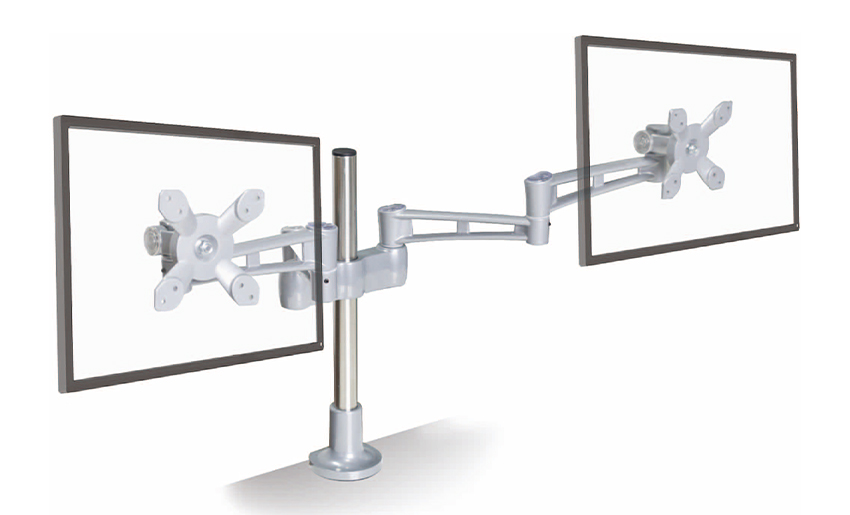 Aluminum Height-Adjustable Dual Monitor Arm for 17–32 Inch ScreensA clamp-mounted aluminum dual arm for 17–32 inch monitors, offering vertical height adjustment; compare your monitor weight and desk thickness before choosing this starting point.View Product →
Two arms can look similar in photos and feel completely different after a week. Reach is the first thing to test. Sit at your desk, hold a screen where you would normally place it, and notice how far forward the arm must extend. A short arm may force the clamp too close to your keyboard; a long arm may wobble if the joint quality is poor.
Joint feel matters just as much. Gas-spring arms use tension to support height changes, which is helpful when you raise and lower screens often. Mechanical arms rely on a fixed friction joint or tool-assisted tension adjustment. Neither is automatically better. A gas-spring arm needs to match your screen weight closely, while a mechanical arm can feel more predictable for a set-and-forget setup. Check whether the tension can be adjusted without removing the screens, and whether the arm stays in place when you type firmly or lean on the desk.
For a two-screen setup that needs easy height changes and a lighter touch during the workday, our gas-spring ergonomic dual monitor arm is designed around that kind of movement. This guide on how to choose a dual monitor desk mount can help you compare clamp styles and adjustment ranges before you commit.
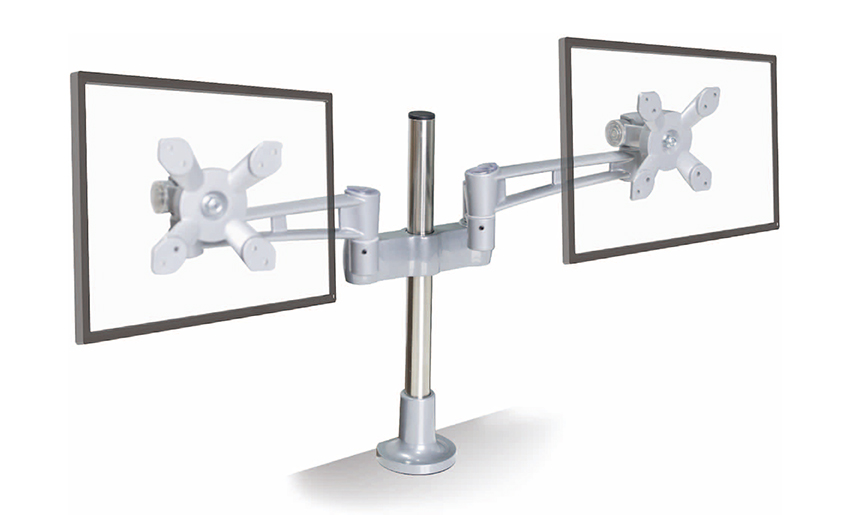 Gas-Spring Ergonomic Dual Monitor Arm with Smooth AdjustmentA dual monitor arm with gas-spring height, tilt, and rotation adjustment for low-effort repositioning; suited to long computer sessions and comparing clamp and adjustment options.View Product →
As a die-casting manufacturer, we pay close attention to the parts you do not see in the product photo: the joint housings, clamp plates, and VESA connection points. A dual display arm carries constant load, and small shortcuts in material or machining show up as droop, creaks, or a clamp that loosens over time. Aluminum and steel are common for good reasons, but the design of the joint and the quality of the assembly matter more than a single material label.
Before installation, look at your desk, not just the arm. A clamp needs a flat, solid edge with enough thickness to grip safely. A grommet mount needs a clean hole and enough room underneath. Thin desk tops may need a reinforcement plate, and some desks with rounded or beveled edges are not suitable for a standard clamp. Also check that the arm can fold back without hitting a wall, a shelf, or the back of the desk.
Small features earn their keep every day: a quick-release VESA plate makes screen removal easier, cable clips keep power and display cords from hanging loose, and a visible bubble level or alignment mark can save time during installation. None of these are glamorous, but they are the details that keep a two-screen setup pleasant months later.
A dual display arm is easier to install when you treat it as a measured assembly, not a race. We suggest this sequence:
If you can, ask a second person to help lift the screens during the first mount. It reduces the chance of dropping a panel or overloading one arm while the other is still loose.
Think about how often you move your screens. A support agent who switches between chat, email, and a knowledge base may adjust screens several times a day, so smooth tension and easy reach matter. A designer or editor may prefer a firmer arm that stays exactly where it is placed. A home-office user with a compact desk may care most about folding the arm back when the workday ends.
If your displays are in the 17–27 inch range and you want a straightforward two-screen mount for everyday office work, our dual monitor mount for 17–27 inch screens is one option to compare against your measurements.
 Dual Monitor Mount for 17–27 Inch Screens with Cable ManagementA space-saving dual arm for 17–27 inch monitors with adjustable positioning, VESA mounting, integrated cable management, and included hardware for everyday two-screen office work.View Product →
A good dual display arm should disappear into your workday. When the fit, reach, and tension are right, you stop thinking about the arm and simply use your screens. That is the quiet standard we build toward: equipment that supports the work without asking for attention.
Your email address will not be published. Required fields are marked *
A Home Office Foldable Laptop Notebook Computer Tr...
See Details
One of the key features of this monitor arm is its...
See Details
Revolutionize your work setup with the Aluminum &a...
See Details
This sleek and sturdy arm is designed to securely ...
See Details
Address: No 3098 Shuanglong Rd, Daqiao Town 314006, Nanhu Area,Jiaxing city, Zhejiang Pro, China
Tel: +86-0573-83222192
Fax: +86-0573-83225688
URL: www.jxjmly.com
Email: [email protected]
Copyright © JIAXING JINMAO ALUMINUM INDUSTRY CO., LTD.All Rights Reserved. Monitor Arms Desk Mount Manufacturers Wholesale Monitor Brackets Suppliers
