

 EN
EN
 English
 Español
 عربى
عربىProduct Consultation
Your email address will not be published. Required fields are marked *
Content
A dual monitor stand is a mounting solution designed to hold two monitors side by side on a single base or set of clamps, freeing up desk space and giving you far more control over screen positioning than monitors sitting on their factory stands ever could. Instead of two bulky monitor bases eating into your desk real estate, a dual stand consolidates everything into one footprint, often using a clamp or grommet mount that attaches directly to the edge or through a hole in your desk. This setup is especially popular among people who work with spreadsheets and reference documents side by side, developers running code on one screen and documentation on the other, and anyone who simply wants a cleaner, more organized desk.
Beyond saving space, a dual monitor stand also improves ergonomics in ways that stock monitor stands typically can't match. Most dual stands allow height adjustment, tilt, swivel, and sometimes full rotation into portrait mode, which means you can position both screens at proper eye level instead of looking down or straining your neck. This kind of adjustability matters more than people expect, since poor screen height is one of the most common contributors to neck and shoulder discomfort during long work sessions.
Dual monitor stands generally fall into a few distinct categories, and understanding the differences helps narrow down which style fits your desk and monitors best. Crossbar stands use a single horizontal bar with two monitor mounts attached, allowing both screens to be positioned independently while sharing one central pole. Dual-arm stands give each monitor its own adjustable arm, which offers more flexibility for spacing the screens apart or angling them inward for an immersive, curved-feel setup. There are also stacking stands, less common but useful for vertical dual-monitor setups, and simple riser-style dual stands that sit flat on the desk without any arm mechanism, which work well for smaller or lighter monitors.
| Stand Type | Adjustability | Best For |
| Crossbar stand | Moderate | Simple side-by-side setups |
| Dual-arm stand | High | Custom angles, independent positioning |
| Riser-style stand | Low | Lightweight monitors, budget setups |
| Stacking stand | Moderate | Vertical dual-screen arrangements |
Picking the right dual monitor stand isn't just about price; a handful of technical details determine whether the stand will actually work with your monitors and desk. Weight capacity is the most critical factor, since every stand lists a maximum supported weight per arm, and exceeding that limit can cause sagging or instability over time. VESA compatibility is equally important, as monitors attach to stands using a standardized hole pattern on the back, typically 75x75mm or 100x100mm, so checking your monitor's VESA spec against the stand's supported sizes prevents a frustrating mismatch after purchase.
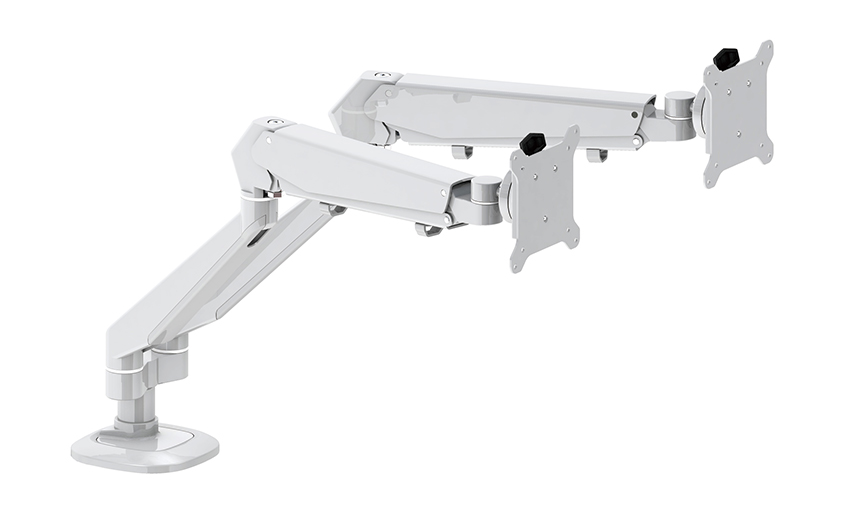
Once a dual monitor stand is mounted, proper positioning makes a significant difference in comfort during long work sessions. The general rule is to set the top of each screen at or slightly below eye level, so your gaze naturally falls toward the upper third of the display without tilting your head up or down. Both monitors should sit roughly the same distance from your eyes, typically around twenty to twenty-eight inches, and angling them slightly inward toward you can reduce the need to constantly turn your neck when switching focus between screens.
Most dual monitor stands offer a choice between a clamp mount, which grips the back edge of the desk without any drilling, and a grommet mount, which threads through a pre-drilled hole in the desk surface for a slightly more stable, permanent installation. Clamp mounts are the better choice for rented spaces, shared desks, or anyone who might want to relocate the setup later, since they leave no lasting marks. Grommet mounts tend to offer marginally better stability for heavier dual-arm setups, but they require either an existing hole in the desk or a willingness to drill one, which isn't always practical or desk-friendly.
Desk thickness is another detail worth double-checking before committing to either option, since most clamp mounts are rated for a specific thickness range, often between half an inch and three inches. Desks that are unusually thick, have a curved edge, or include a raised lip can sometimes prevent a clamp from sitting securely, so measuring beforehand avoids the hassle of returning a stand that simply doesn't fit.
Even a high-quality dual monitor stand can feel wobbly or unstable if a few setup details are overlooked. Overtightening the clamp can strip threads or damage the desk surface, while undertightening leaves the entire stand loose enough to drift out of position throughout the day. It also helps to balance monitor weight evenly between both arms; pairing a much heavier monitor with a significantly lighter one on the same stand can sometimes cause uneven tension, especially on stands with a shared central pole. Lastly, running cables without any management plan often leads to a tangled mess that pulls at the monitors and disrupts the adjustability the stand was meant to provide, so routing cables through the stand's built-in clips or arms, if available, keeps everything tidy and prevents unnecessary strain on the connections.
Your email address will not be published. Required fields are marked *
A Home Office Foldable Laptop Notebook Computer Tr...
See Details
One of the key features of this monitor arm is its...
See Details
Revolutionize your work setup with the Aluminum &a...
See Details
This sleek and sturdy arm is designed to securely ...
See Details
Address: No 3098 Shuanglong Rd, Daqiao Town 314006, Nanhu Area,Jiaxing city, Zhejiang Pro, China
Tel: +86-0573-83222192
Fax: +86-0573-83225688
URL: www.jxjmly.com
Email: [email protected]
Copyright © JIAXING JINMAO ALUMINUM INDUSTRY CO., LTD.All Rights Reserved. Monitor Arms Desk Mount Manufacturers Wholesale Monitor Brackets Suppliers
